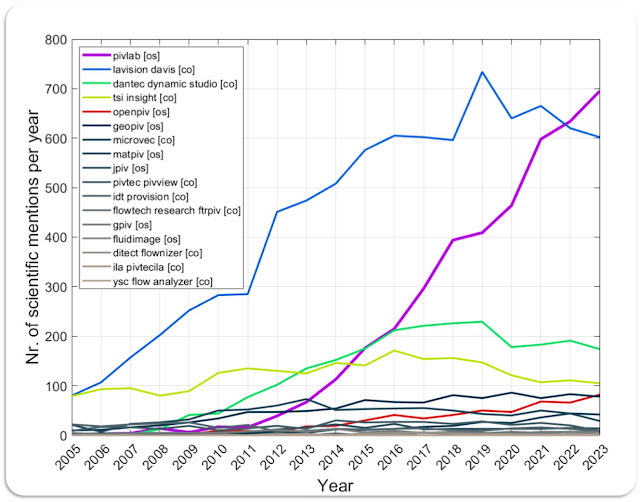
(updated 2024) PIVlab seems to become the most cited PIV software of all available PIV softwares (commercial [co] and open source [os]). I performed a search on Google scholar using all PIV software names that I could think of. The per-year-keyword-occurance might be a good indicator for the popularity of a software in academic research. Steep increase in Keyword occurance for PIVlab (magenta)... These are the search terms I used for Google scholar. I wrote a Matlab script that queries Google scholar for these search terms for each year between 2005 and 2023. Google limits the amount of requests per IP, so I had to use a VPN and change the IP frequently: "lavision" AND "davis" AND ("piv" | "particle image velocimetry") ("pivlab" | "piv lab") AND ("piv" | "particle image velocimetry") -"@pivlab.net" "dantec" AND ("dynamic studio" | "dynamicstudio") AND ("piv...
Welcome wOFV (wavelet-based optical flow velocimetry) to the family of open-source and easy to apply velocimetry algorithms! I released the beta yesterday evening (just before leaving to holidays 😀): Optical flow in PIVlab, see the video above for some comparisons to classical PIV. Download here: https://github.com/Shrediquette/PIVlab/releases Implemented by Bryan E. Schmidt, Gauresh Raj Jassal from Flow Physics and Imaging Laboratory at case.edu and me.
PIVlab can now run in batch mode with the GUI: To prepare a batch session, perform your setup as before (including image loading, calibration, pre- and post processing, but WITHOUT hitting the "Analyze all frames" button ). Then save your session. To perform a batch analysis, you can now enter the following: PIVlab_GUI(1,'c:\folder\my_first_PIVlab_session.mat'); PIVlab_GUI(1,'c:\folder\my_second_PIVlab_session.mat'); PIVlab_GUI(1,'c:\folder\my_third_PIVlab_session.mat'); Where the first number is the number of CPU cores to use (when you have the parallel computing toolbox), and the second argument is the path to your session file. PIVlab will then start, load the session file, perform the analysis, and save the session file in the same folder and with the string '_BATCH' attached to the filename. This allows you to prepare large amounts of image data for analysis, and process them all at once e.g. during the night.